
This is the 1st version of i-WiSwiSys (integrated-WiSwiSys). i-WiSwiSys is actually a home automation system same as WiSwiSys . But it has been connected to my home circuitry. That's why the prefix 'integrated'. With its help I am able to control both my sit out lights and gate lights through my phone.Read on to know more.
I made a custom app for this project with many features (compared to the app of WiSwiSys). Click here to know more on the custom app for i-WiSwiSys.
Features:
1) It has 2 modes:Manual mode and Automatic mode, which is selected using the switches on the i-WiSwiSys box.
Manual mode: The lights can be turned ON and OFF only manually using their physical switches
Automatic mode: The lights can be turned ON and OFF using app using their virtual switches
2)The lights can be controlled from anywhere in the world
3)Voice command (google assistant) support using IFTTT
-The latest version of this project is i-WiSwiSys 2.8-

I made a custom app for this project with many features (compared to the app of WiSwiSys). Click here to know more on the custom app for i-WiSwiSys.
Features:
1) It has 2 modes:Manual mode and Automatic mode, which is selected using the switches on the i-WiSwiSys box.
Manual mode: The lights can be turned ON and OFF only manually using their physical switches
Automatic mode: The lights can be turned ON and OFF using app using their virtual switches
2)The lights can be controlled from anywhere in the world
3)Voice command (google assistant) support using IFTTT
-The latest version of this project is i-WiSwiSys 2.8-
 |
| i-WiSwiSys box |
 |
| i-WiSwiSys logo |

i-WiSwiSys after connection
The real motive behind the making of this project was that, we had to always keep our sit out lights turned on when we went outside and returned back late. Thus electricity would be consumed even though no one is at home (i.e) it would be wasted.
So to solve this problem I made i-WiSwiSys so that I could control both my sit out and gate lights remotely😀 .
Here are the things I used for this project:
1) NodeMCU ESP8266
2) 2-channel relay module
3) 220AC to 12V DC SMPS power supply
4) Bread board power supply
5) 8v Voltage regulator IC with heat sink
6) 2 Switches
7) Jumper wires and ordinary electricity wires.
Working:
The working of the project is simple. I used Blynk app for making this project that made things on the programming side very easy (Basically I didn't had to do much on the programming side). 2 buttons were made on the Blynk app corresponding to each switches.
When the switch is turned ON on the app, it would turn on the relay which acts the switch for the circuit to which it is connected.

Behind the making
1) Pulling the wires to the desired place
This was the most tiring job! My gate light switch is in bedroom and my sit out light switch is near to my entrance. My plan was to keep the i-WiSwiSys box near to the entrance switch board. So for it I had to pull the wires of gate switch internally through the wire pipe which wasn't easy at all.
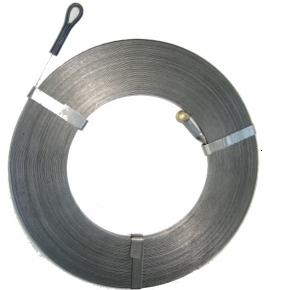
I first managed to pull the wires to the entrance room without using a wire puller spring😁. But after that the wires got stuck I couldn't pull it to the desired place. So I had to buy a wire puller spring.
So to solve this problem I made i-WiSwiSys so that I could control both my sit out and gate lights remotely😀 .
Here are the things I used for this project:
1) NodeMCU ESP8266
2) 2-channel relay module
3) 220AC to 12V DC SMPS power supply
4) Bread board power supply
5) 8v Voltage regulator IC with heat sink
6) 2 Switches
7) Jumper wires and ordinary electricity wires.
Working:
The working of the project is simple. I used Blynk app for making this project that made things on the programming side very easy (Basically I didn't had to do much on the programming side). 2 buttons were made on the Blynk app corresponding to each switches.
When the switch is turned ON on the app, it would turn on the relay which acts the switch for the circuit to which it is connected.

Yes the working is simple but the work wasn't simple at all!😅 Read on to know some behind the making and interesting facts.
Behind the making
1) Pulling the wires to the desired place
This was the most tiring job! My gate light switch is in bedroom and my sit out light switch is near to my entrance. My plan was to keep the i-WiSwiSys box near to the entrance switch board. So for it I had to pull the wires of gate switch internally through the wire pipe which wasn't easy at all.
I first managed to pull the wires to the entrance room without using a wire puller spring😁. But after that the wires got stuck I couldn't pull it to the desired place. So I had to buy a wire puller spring.
2) Work completion
I completed the circuit within few days and fixed the box on 04th March 2019. Since it was under testing I didn't reveal this project publicly.
3) Problems and fixes

It had a problem that would keep the lights of both gate and sit out ON when the i-WiSwiSys got restarted due to power loss.
I came to know that by introducing a small change in the program I will be overcome this problem. Thus it was fixed.
4) From mistake comes features

Initially the Mode selector switch on the i-WiSwiSys box had a problem. Even when the mode was changed, you could operate the i-WiSwisys in both modes. The idea to overcome this problem came from a mistake in my connection😅 . Thus I fixed that problem too
5) Voice recognition problem
The voice recognition wasn't smooth at all and google assistant would trigger other actions instead of switching the switches.
6) Custom app development

I planned to make a custom app for this project which would have many features than the original WiSwiSys app. And after days of working, I was finally able to make an app for i-WiSwiSys😀 To learn more on the custom app click here.
After many months, one of the relays stopped working and I had to remove i-WiSwiSys 1.0😔. But it wasn't the end... Click here to know more.
I completed the circuit within few days and fixed the box on 04th March 2019. Since it was under testing I didn't reveal this project publicly.
3) Problems and fixes
It had a problem that would keep the lights of both gate and sit out ON when the i-WiSwiSys got restarted due to power loss.
I came to know that by introducing a small change in the program I will be overcome this problem. Thus it was fixed.
4) From mistake comes features
Initially the Mode selector switch on the i-WiSwiSys box had a problem. Even when the mode was changed, you could operate the i-WiSwisys in both modes. The idea to overcome this problem came from a mistake in my connection😅 . Thus I fixed that problem too
5) Voice recognition problem
The voice recognition wasn't smooth at all and google assistant would trigger other actions instead of switching the switches.
6) Custom app development
I planned to make a custom app for this project which would have many features than the original WiSwiSys app. And after days of working, I was finally able to make an app for i-WiSwiSys😀 To learn more on the custom app click here.
After many months, one of the relays stopped working and I had to remove i-WiSwiSys 1.0😔. But it wasn't the end... Click here to know more.


No comments:
Post a Comment
Comment your thoughts